
Getting the answer you came for.
Start with the complete review workflow, supported inputs, and answers to the questions that come up first.
A review, start to finish.
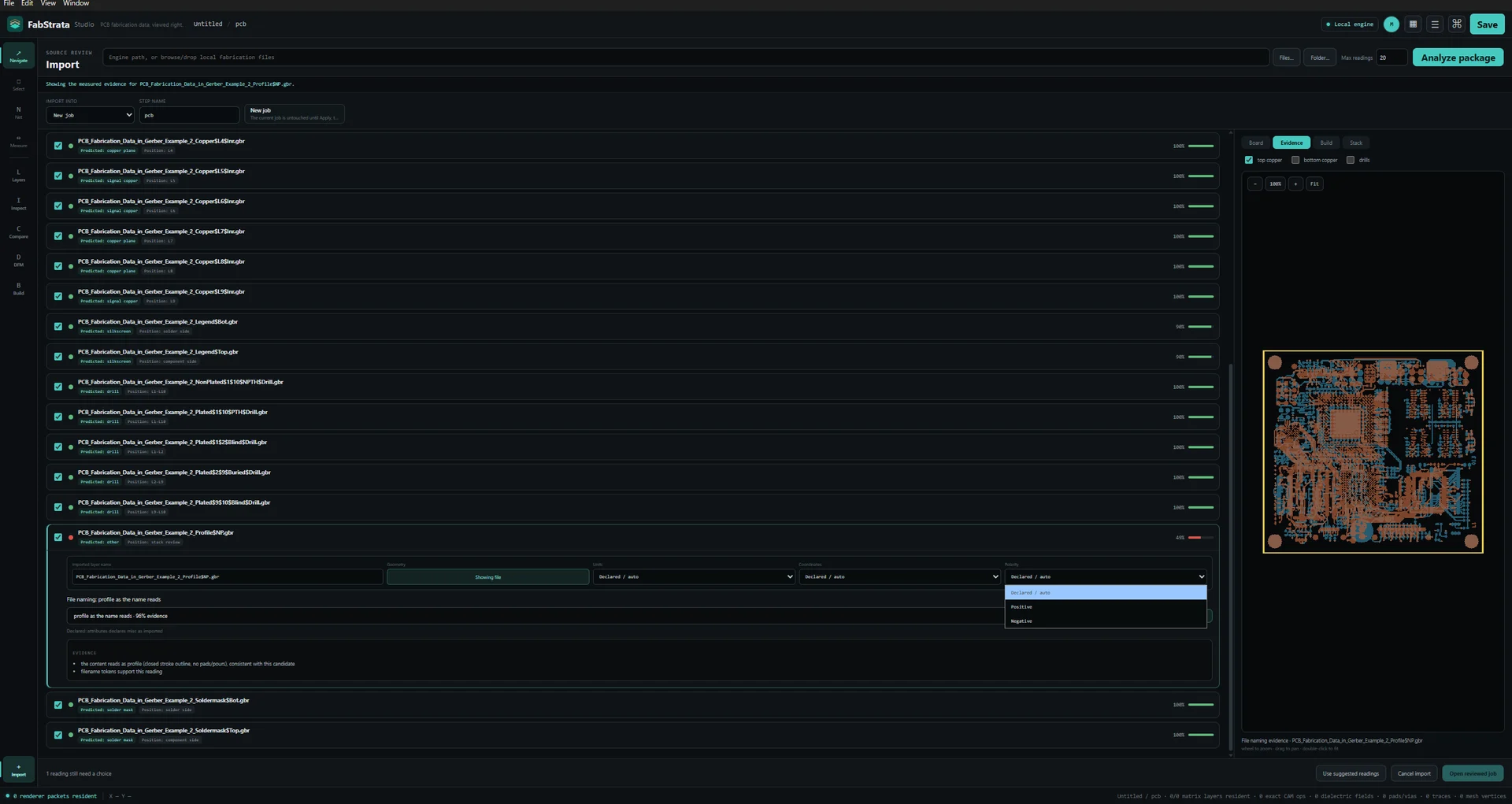
Open a package
Drop a folder, a ZIP, an ODB++ TGZ, a DXF or PDF reference drawing, one or several loose fabrication files, or an existing project onto the window — or use the Import workspace.
Review the interpretation
Choose New job, New step, or a named existing step. Read the predicted role and position for each file, expand a row when you want the evidence, and override units, coordinate format, zero mode, polarity, or side where the reading is wrong.
Check the stack
Use the Board, Build, and Stack views to confirm the proposed copper and dielectric construction, the physical order, and the drill and route spans before you apply.
Inspect and verify
Navigate, select, measure, and pull nets. Navigate never selects; Select and Net act on the active layer. Compare against an IPC-D-356 reference or a previous revision step.
Save and hand it on
Save a .fabio project, then export an HTML report, a composite PNG, per-layer check films, or a GLB for people who do not have FabStrata.
What FabStrata reads, and where the edges are.
Gerber X1/X2, Excellon/XNC, ODB++Design, DXF, PDF, and IPC-D-356 enter through reviewed import workflows.
Open limitsODB++ broader-producer validation and PDF raster/reference fidelity remain open. Any format table must show the limits adjacent to the format, not only on another page.
| Format | Accepts | Status | Limits and notes |
|---|---|---|---|
| Gerber X1 / X2 | Loose files, folders, ZIP | Supported | Reviewed import; parser readings are operator-controlled.Per-file and per-type control of units, coordinate format, zero mode, polarity, and side. Gerber job metadata is read alongside the artwork. |
| Excellon / XNC | Loose files, folders, ZIP | Supported | Reviewed import; spans and plating stay operator-editable.Drill and route data with tools, plating, operation, and editable spans reconciled to exact visible hits. |
| ODB++Design | Directory, .tgz / .tar.gz | Supported, with open limits | Broader-producer validation is still open. Guarded to a fresh job. `.Z` compression, transformed repeats, composite symbols, declared stackup, and some semantic sections remain limited.Declared matrix, steps, layers, profile, graphic features, symbols, drill tools, polarity, and spans import through the shared reviewed path. Unsupported sections stay visible rather than being silently dropped. |
| DXF | Mechanical and reference drawings | Reference context | Carried in reference context, not as fabrication artwork.Native geometry through the shared reviewed import path, in information context alongside the fabrication layers. |
| Native vector and text pages | Reference context | Raster page fidelity, clipping and transparency, source-font outlines, and scanned-page OCR are not complete. Reference context only.Native vector and text page intake through the reviewed import path. Page-image fidelity and broader real-producer validation remain open work. | |
| IPC-D-356 | Reference netlist | Supported | Imported as a reference for comparison, not as artwork.Compared against the connectivity extracted from physical copper and plating. |
| FabStrata project | .fabio, legacy .camtrace | Supported | Unsupported project versions are rejected, not guessed.Full project persistence. Supported legacy projects migrate on open; an unsupported project version fails with a recovery instruction rather than opening into an undefined state. |
| IPC-2581 and STEP | — | Not currently supported | Not currently imported.These formats are outside the current input boundary. |
Review outputs
- HTML reportSelf-contained review report that opens without FabStrata installed.
- Composite PNGThe 2D composite as currently presented.
- Check filmsPer-layer check film images.
- GLBThe physical stack as 3D geometry. It approximates some macro pads and omits semantic text geometry.
These are review outputs. FabStrata does not write fabrication Gerber, NC, ODB++, or IPC-2581 data.
First questions.
The 3D view will not start, or the window goes blank.
The renderer needs a WebGPU-capable graphics driver. Update the graphics driver first. If the GPU device is lost while you are working, FabStrata restores the document-derived scene rather than losing your project — reopen the view and continue.
A layer imported with the wrong units or coordinate format.
Reimport and set the parser controls explicitly. Units, coordinate format, zero mode, polarity, and side can be set per file or as a type default, and the board preview refreshes from that exact reading before you apply.
A net looks wrong after I edited a drill span.
A span, plating, or geometry edit marks connectivity stale on purpose. The rebuild is deferred until a connectivity-dependent action asks for it; run a net action and the derived netlist refreshes once.
An ODB++ package will not import into my existing job.
ODB++ import is guarded to a fresh job, because the package carries its own matrix, steps, and stackup. Import it as a new job and use revision comparison if you need to relate it to existing work. Broader-producer validation is still open, so unsupported sections are shown rather than silently dropped.
A PDF or DXF did not come in as a fabrication layer.
It should not. DXF and native PDF pages are carried in reference context, not as fabrication artwork. PDF raster page fidelity, clipping and transparency, source-font outlines, and scanned-page OCR are not complete.
A project will not open.
An unsupported project version fails deliberately, with a recovery instruction, rather than opening into an undefined state. Keep that message — it names the version FabStrata found.
Support contact coming soon.
A direct FabStrata support channel will be published here.
Your board stays local. FabStrata will not need your board data to help. PCB review and rendering run locally. A network connection is used for sign-in, entitlement refresh, account features, and updates; fabrication data is never uploaded to FabStrata.